

Super Bear Adventure PC Download and Play on Windows & Mac
Requirements
Windows 10 / 11
Version
13.0.5
Size
253.7 MB
Category
Adventure
Updated
September 27, 2026
Developer
Earthkwak Games
Playing a 3D platformer on a small phone screen is fun until your thumbs cover half the view, the battery drops to 15%, and a call interrupts the boss fight. Baaren’s kingdom is big and colourful, so it makes sense that many players want a bigger screen for it. That is exactly why Super Bear Adventure PC is one of the most searched topics around this game.
The good news is that you can play it on your computer without much trouble. There is an official way for Windows, and there are emulator methods for both Windows and Mac. In this guide, we will go through each method in simple steps, so you can pick the one that suits your PC.
If you only want the phone version, you can go back to our Super Bear Adventure homepage for the full game guide.
Super Bear Adventure PC App Detail
| Information | App Detail |
| Game Name | Super Bear Adventure |
| Developer | Earthkwak Games |
| Category | Adventure |
| Version | v13.0.5 |
| Updated | September 27, 2026 |
| Main Character | Baaren |
| Original Platform | Android and iOS |
| PC Methods | Google Play Games on PC, Android Emulator |
| Supported Systems | Windows 10/11, Mac (via emulator) |
| Game Modes | Single Player and Multiplayer |
| Price | Free |
Is There a Super Bear Adventure PC Version?
Yes, but it depends on what you mean by PC version. Super Bear Adventure was made for mobile, so it does not come as a normal Windows installer. Instead, you play the same Android game on your computer in one of two ways: through Google Play Games on PC, or through an Android emulator.
The gameplay does not change. You still rescue bear friends, explore regions, fight enemies, and collect cosmetics. Only the screen size and the controls are different.
Super Bear Adventure PC Download for Windows 10 and 11
For Windows users, the official route is the simplest and safest one. Google offers Super Bear Adventure through Google Play Games on PC, so you don’t need any third-party file.
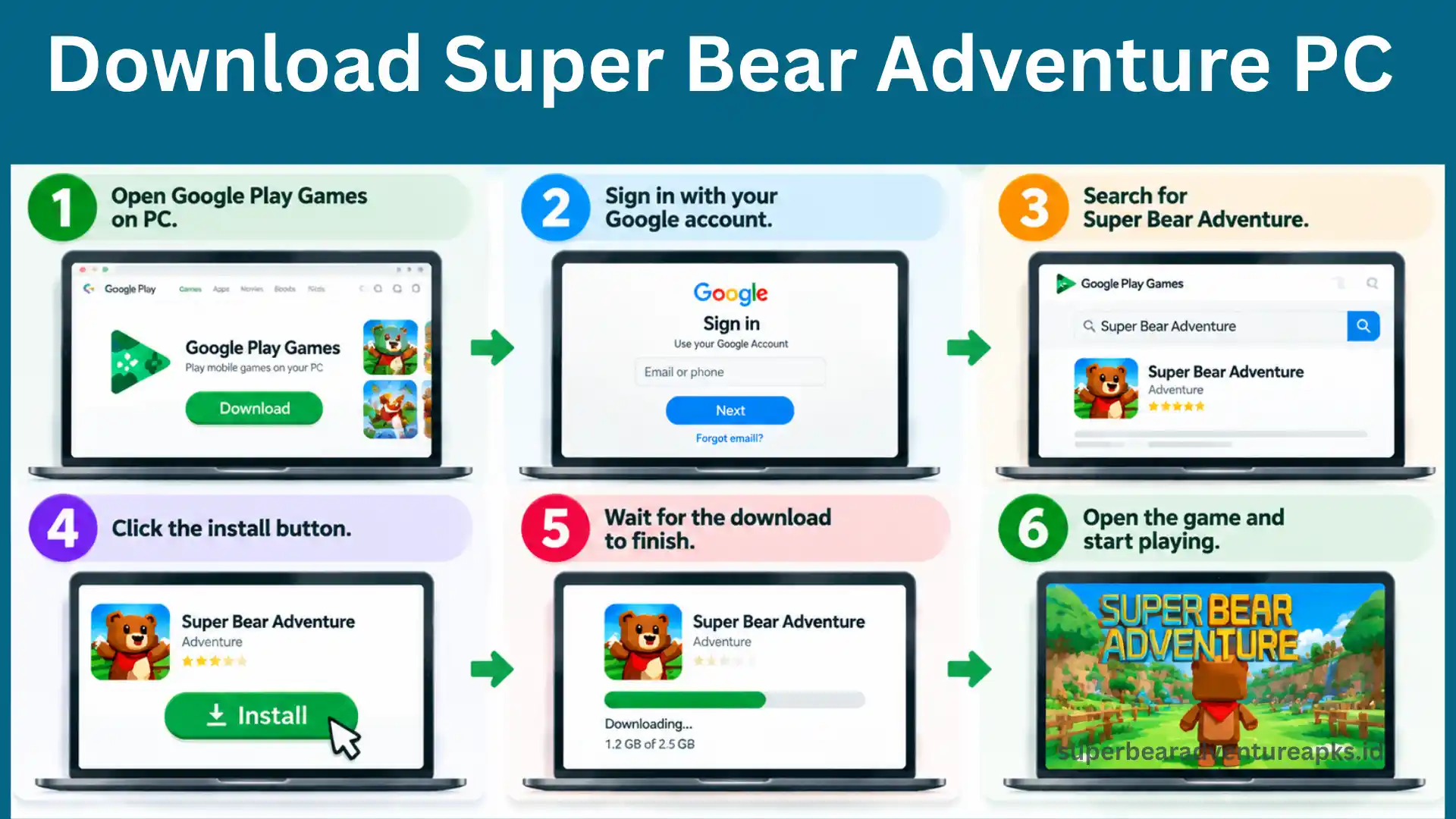
If you don’t see the install button, your PC may not meet Google’s requirements. In that case, use the emulator method below.
Super Bear Adventure on PC Using an Emulator
An emulator is a program that creates a small Android phone inside your computer. Once it is running, you can install Android games on it and play them with your mouse and keyboard. It is also the way to play the game on Mac.
BlueStacks, LDPlayer, and NoxPlayer are the three names most players use. Here is the basic process, and it works almost the same on all of them:
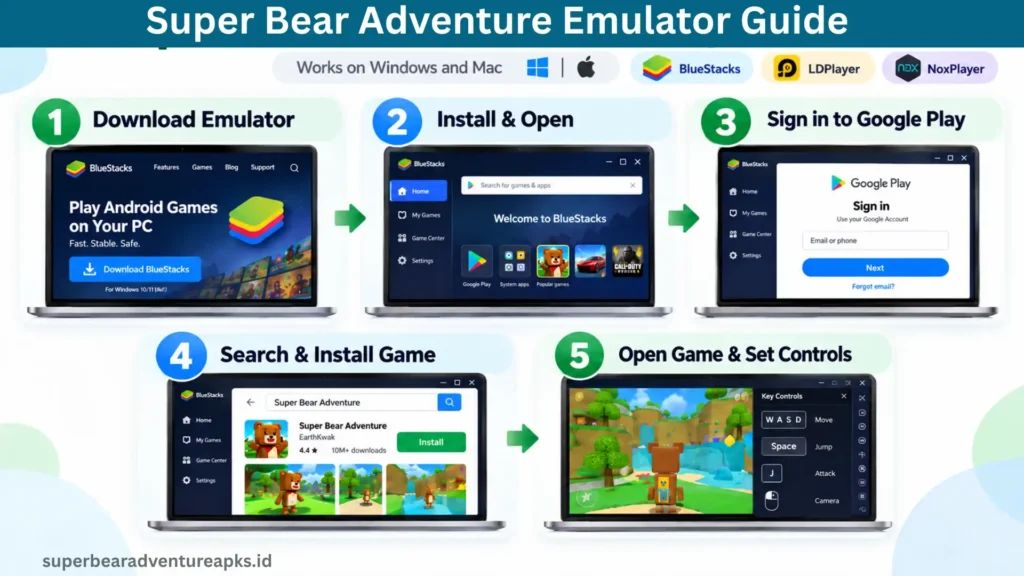
Most emulators also let you set your own keys for jumping, attacking, and moving the camera. Spend two minutes on this setup because it makes a big difference in platforming levels.
Super Bear Adventure Mac: Can You Play It?
Google Play Games on PC is for Windows, so Mac users need another route. The easiest option is an Android emulator that supports macOS, such as BlueStacks. Install it, sign in to Google Play, and download the game like you would on a phone.
Keep in mind that Macs with newer chips can behave differently with some emulators. If one emulator feels slow, try another before you give up.
Super Bear Adventure on Laptop: Will It Run Smoothly?
You don’t need a gaming laptop for this game. It is a light 3D title, so most modern laptops can handle it. Still, an old laptop with low RAM may lag when the emulator is open. Check these system requirements before you install anything:
| Category | Minimum | Recommended |
| Operating System | Windows 10 (64-bit) | Windows 11 (64-bit) |
| Processor | Intel or AMD Dual-Core | Intel Core i5 / AMD Ryzen 5 |
| RAM | 4 GB | 8 GB or more |
| Storage | 5 GB free | 10 GB free (SSD) |
| Graphics | Integrated | Dedicated |
| Internet | Needed for multiplayer | Stable Wi-Fi |
If your laptop heats up, close other programs and lower the graphics quality in the emulator settings.
Super Bear Adventure PC Steam, itch.io and Game Jolt: What Is Real?
Many people search for Super Bear Adventure on Steam, itch.io or GameJolt, so let’s clear this up. At the time of writing, we could not find an official Steam release from Earthkwak Games. The itch.io and GameJolt pages you may see are usually uploaded by fans or third parties, not by the developer.
That doesn’t mean they are always harmful, but you should be careful. Unknown uploads can be outdated, broken, or unsafe. For a clean setup, stick to Google Play Games on PC or a trusted emulator with the Google Play version of the game.
Super Bear Adventure PC Online and Multiplayer
Super Bear Adventure PC online play works the same way as on Android. You need a steady internet connection, and the multiplayer areas will load inside the game. Single-player content can be played offline, so you can still explore when your Wi-Fi is weak. For more about playing with others, keep an eye on our upcoming multiplayer guide on the blog.
Super Bear Adventure MOD APK for PC
Some players also look for Super Bear Adventure MOD APK for PC. An APK file is made for Android, so it can’t be opened directly on Windows. It only works inside an emulator, using the same steps we shared above.
Before you try it, remember that modded files are made by third parties, not by Earthkwak Games. Features can change by build, and the file should always be scanned first.
Super Bear Adventure PC Old Version
Sometimes the newest update has a bug, or your emulator runs an older Android version. In that case, players go looking for the Super Bear Adventure PC old version. You can use the same emulator method with an older APK. We keep the earlier releases together on our old version page.
Do note that older versions may not support new content or some multiplayer features.
Super Bear Adventure PC vs Mobile
| Feature | PC | Mobile |
| Controls | Keyboard, mouse or controller | Touch screen |
| Screen Size | Large | Small |
| Battery Issues | None | Common |
| Setup | Needs Google Play Games or emulator | Direct install |
| Performance | Depends on your hardware | Depends on your phone |
If you enjoy the game on your phone, PC is worth trying, especially for the harder platforming parts. And if you own an iPhone, you can check our iOS guide instead.
Super Bear Adventure PC Tips for Better Gameplay
Super Bear Adventure PC Not Working? Common Fixes
Frequently Asked Questions
Final Thoughts
Super Bear Adventure is already a fun 3D platformer, and playing it on a bigger screen makes the colourful worlds easier to enjoy. Windows players can use the official Google Play Games route, and everyone else can rely on a good emulator. Just stay away from unknown Steam, itch.io or GameJolt uploads, and always download from trusted places. So pick the method that fits your computer and go back to saving Baaren’s kingdom on a bigger screen.