
Super Bear Adventure Old Version Download: v12.1.4, v12.1.3 & More
A new update should make a game better, but that is not always how it feels. Sometimes the latest version runs slowly on your phone, changes a feature you liked, or brings a bug that was not there before. When that happens, many players start looking for the Super Bear Adventure old version to get back a build that felt stable and familiar.
The good news is that older builds are easy to find, and you can use them on Android and even on a PC through an emulator. The tricky part is knowing which one to pick. Each version added or fixed something different, and a few of them change how multiplayer works. That is why we have listed every version from v12.1.4 down to v1.9.9.1 with its release date and the changes it brought.
So, if you want to go back to an earlier build, compare it with the latest v13.0.8, or simply see how the game has changed over the years, this page has it all in one place. For the newest release, you can visit our Super Bear Adventure MOD APK page.
Additional Information
| Information | App Detail |
| Game Name | Super Bear Adventure (Old Versions) |
| Developer | Earthkwak Games |
| Available Versions | v12.1.4, v12.1.3, v12.1.2, v12.1.1, v12.1.0, v12.0.3, v12.0.0, v1.9.9.1 |
| Latest Version | v13.0.8 |
| Updated | October 07, 2026 |
| Category | Adventure / 3D Platformer |
| Platform | Android (PC through an emulator) |
| File Format | APK / XAPK |
| Original Release | June 10, 2017 |
| Root Required | No |
| Price | Free |
What is Super Bear Adventure Old Version?
Super Bear Adventure has been updated many times since its first release in 2017. Every update has its own version number, and an old version is simply any earlier build that came before the current one. The story and the main goal stay the same in all of them. You play as Baaren, rescue your bear friends, and stop the purple honey trouble in the kingdom.
What changes from version to version is the content. Older builds have fewer cosmetics, fewer levels of items, and in some cases no multiplayer at all. Newer builds bring more features, but they also ask more from your device. That is why an older version can feel lighter on some phones.
Super Bear Adventure Old Versions List (Android)
Here are the older versions people search for the most, with the date each one came out and what it changed. The latest version, v13.0.8, is included in the first row so you can compare.
Super bear Adventure v13.0.8 (Latest)
Released On: October 07, 2026
Size: 277.2 MB
Mission timer fix, photo mode skybox fix, moose enemy fixes, stuck-on-bouncy-surface fix.
Super bear Adventure v12.1.4
Released On: Apr 28, 2026
Size: 187.1 MB
New multiplayer invite code format with copy and paste, fix for save files that could get corrupted and wipe progress.
Super bear Adventure v12.1.3
Released On: Nov 26, 2025
Size: 227.4 MB
Version number shown in the lobby, fast restart timer fix, head cosmetic and eye fixes.
Super bear Adventure v12.1.2
Released On: Nov 17, 2025
Size: 212.1 MB
New sound effects, many movement fixes (landing, long jump, dive), better prop hunt emote, level unlock cutscene fix.
Super bear Adventure v12.1.1
Released On: Oct 25, 2025
Size: 212.1 MB
Better audio at DJ Pierre’s set, updated mission order, Super Bear Fighters balance, locked emote and lootbox fixes.
Super bear Adventure v12.1.0
Released On: Oct 16, 2025
Size: 207.5 MB
Group and infection emotes, Super Bear Fighters arcade machine, 3 new daily missions, emotes in the lobby.
Super bear Adventure v12.0.3
Released On: Aug 16, 2025
Size: 199.6 MB
Easier object grabbing, grabbing while swimming, speedrun changes, help window when you fail to join a party.
Super bear Adventure v12.0.0
Released On: July 13, 2025
Size: 193.7 MB
Multiplayer for up to 4 players, mole challenge bonus levels, emote wheel, wall run and ledge grab moves, new audio engine.
Super bear Adventure v1.9.9.1 (Update 1.9.9)
Released On: July 26, 2025
Size: 84.1 MB
Keyboard and gamepad bindings menu, new camera behavior, new Scarf item, engine update, bug fixes.
All dates and changes in this table come from the developer’s official changelog.
Which Super Bear Adventure Old Version Should You Choose?
The right build depends on what you want from the game. Here is a simple way to pick.
Super Bear Adventure Old Version vs Latest Version
The latest version is v13.0.8, and it is a big step ahead of the 12.x line. This table shows what you would miss by going back.
| Feature | Old Versions (12.x) | Latest Version (13.x) |
| Crystalline Lagoon Level | Not available | Available |
| Hardcore Mode | Not available | Available |
| New Items | Fewer cosmetics | 150+ new items added |
| Customization Area | Older layout | New interface with preset outfits and search |
| Multiplayer | Available from v12.0.0 | Available |
| Wheel of Fortune | Available | Removed |
| Save Kept After Uninstall (Android) | Not guaranteed | Supported from v13.0.3 |
| Bug Fixes | Several known bugs | Most recent fixes |
If none of those features matter to you, an older build is still a fine choice. If you enjoy new content, the latest version is the better pick.
Super Bear Adventure Old Version 1.0.2, 10.0 and Other Classic Builds
Some players search for very early or very specific builds, so here is what they were.
You may also see people searching for a 2006 version. There is no such build. The game was first released in June 2017, so anything claiming to be from 2006 is not real.
Why Do Players Use Super Bear Adventure Old Versions?
There is no single reason, but these are the ones we hear most often.
A Familiar Game Feel
Some players simply liked how the game felt before a big update. Older builds keep the same layout, the same menus, and the same pace that they got used to.
Lighter Performance on Some Phones
Newer versions add more content, so they ask a little more from your device. If your phone is old, a previous build may feel smoother, although this depends on your hardware.
A Simpler Way to Play
Earlier builds have fewer emotes, fewer cosmetics, and fewer extras. That makes them feel calmer and easier to understand, especially for someone who only wants to run, jump, and rescue bears.
Offline Single-Player Fun
You can still enjoy regular single-player content without an internet connection in older builds. Only multiplayer needs to be online.
Avoiding a Bug in the Newest Update
Sometimes a fresh update has a problem that gets fixed only in the next patch. Going back one version can be a quick way to keep playing while you wait.
Super Bear Adventure Mod APK Old Version
Many people also search for the Super Bear Adventure MOD APK old version, because older MOD builds were often lighter and worked with earlier game files. These builds are made by third parties, not by Earthkwak Games, so features can be different in every file. Some may have unlimited money or unlocked items, while others may have only one small change.
Before you install any MOD file, scan it and check the permissions it asks for. You can also read more about the latest modified version on our Super Bear Adventure MOD APK page.
How to Download Super Bear Adventure Old Version APK on Android
Installing an older version is easy, but the order of the steps matters. Follow them one by one to avoid errors.
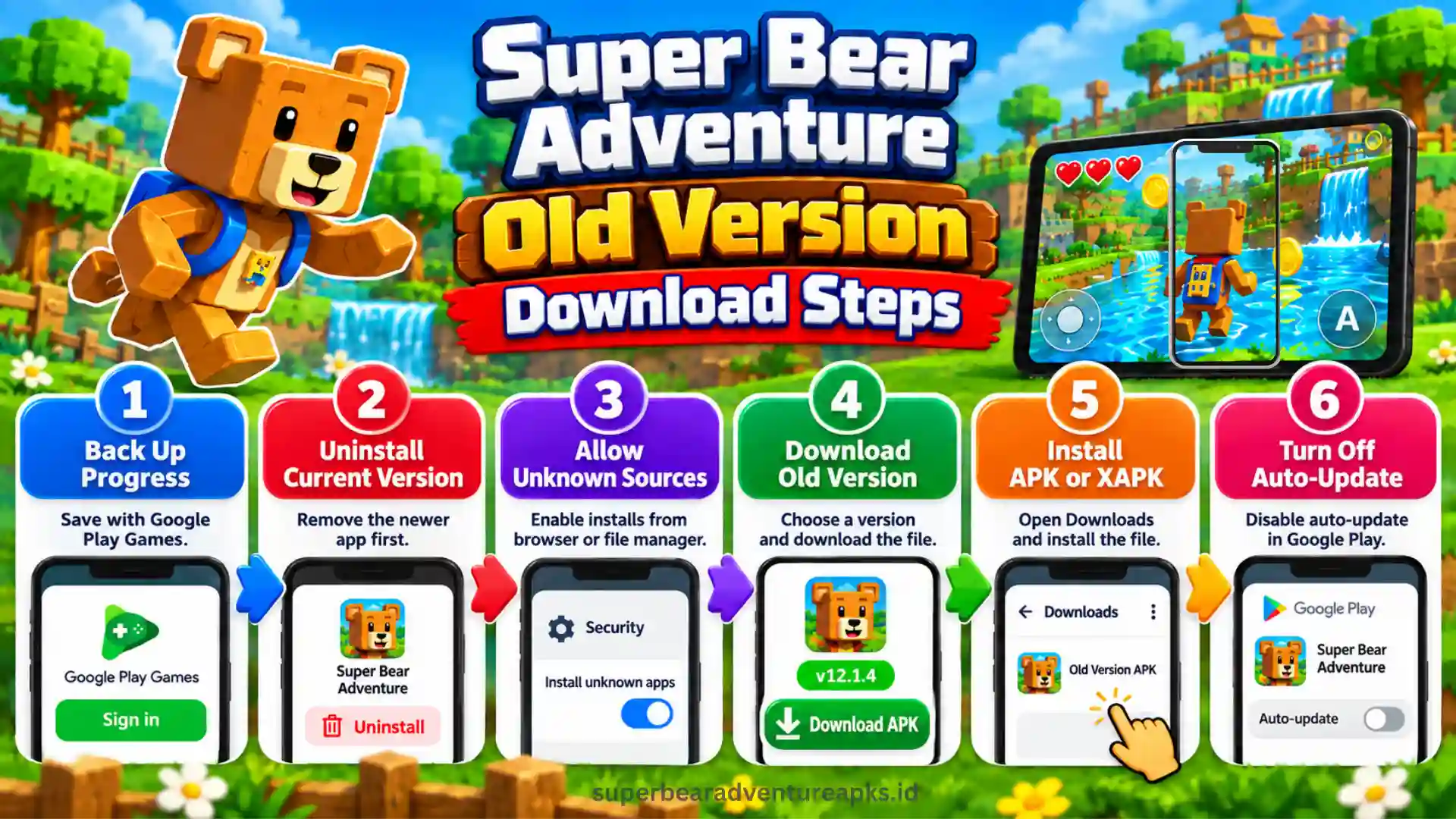
Once everything is done, open the game and check the version number in the lobby or settings to make sure you have the right one.
Super Bear Adventure PC Old Version
You can also play an older build on a computer. Since a normal Windows PC cannot open an Android file directly, you will need an emulator such as BlueStacks or LDPlayer.
For more details about the official PC options, you can read our Super Bear Adventure PC page.
Super Bear Adventure Old Version iOS
Unfortunately, iPhone and iPad players cannot choose an older version. Apple’s App Store only installs the newest build that your device supports, and APK files cannot run on iOS at all. If you use an Apple device, you can check the Super Bear Adventure iOS page for the safest way to download and update the game.
Common Problems and Fixes
Most old version problems come from small mistakes, and they are easy to fix. Check these first.
Pros and Cons of Super Bear Adventure Old Versions
| Pros | Cons |
| Familiar game feel | Fewer levels and cosmetics |
| Can feel lighter on some phones | Missing new content like the Crystalline Lagoon |
| Works offline for single-player | Known bugs may still be there |
| Multiplayer available from v12.0.0 | Party members must use the same version |
| Free to download | Manual updates and extra security checks |
Super Bear Adventure Old Version Tips and Tricks
Frequently Asked Questions
Final Thoughts
Going back to a Super Bear Adventure old version can be a smart move when the newest update does not suit your phone or your play style. Our list gives you a clear path, from v12.1.4 with its safer saves to v12.0.0 with the first multiplayer, and even the classic v1.9.9.1. Just remember to back up your progress, keep every player in a party on the same version, and download only from sources you trust. So, pick the build that fits your device, and start exploring Baaren’s kingdom the way you like it.