Super Bear Adventure Multiplayer, How Online Co-op Really Works
Playing Super Bear Adventure alone is already a full experience, but once you have friends who also play, the single player loop can start to feel like it is missing something. The multiplayer mode, often shortened to just SBA multiplayer in community posts, answers that by letting you play online with friends, exploring the same kingdom together, trading jokes in a shared lobby, and taking on missions as a team instead of solo.
Here is exactly how super bear adventure multiplayer online works today, from setting up a party for the first time to the small details that trip people up, like invite codes that will not connect or a friend stuck on an older version.
What You Get in Multiplayer Mode That Single Player Does Not
The core kingdom, worlds, and story stay the same whether you play solo or with others, but multiplayer adds a social layer on top of it.
How to Play Super Bear Adventure Multiplayer with Friends
Setting up a session is straightforward once you know where to look in game, and it only takes a minute the first time you walk through it.
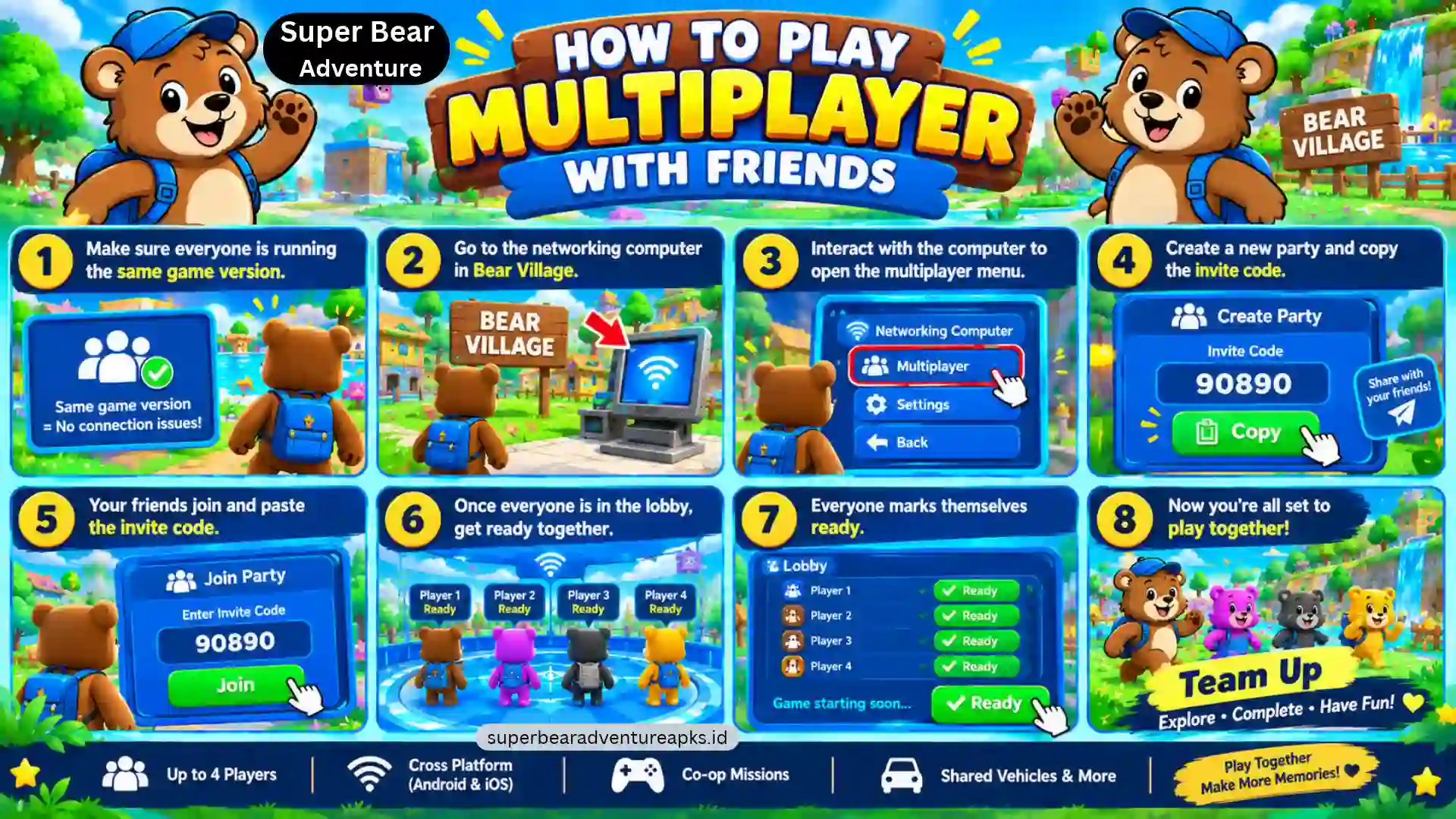
Playing Across Android, iOS and Other Devices
One of the more useful parts of super bear adventure multiplayer online is that it does not lock you into a single platform. Multiplayer on Android and multiplayer on iOS both connect to the same servers, so a mixed group does not need everyone to own the same type of phone. If your group includes a mix of devices, double check that everyone is still on a matching game version first, since platform differences matter far less than version mismatches do.
If part of your group plays on a computer instead of a phone, our Super Bear Adventure PC guide walks through getting the game running through an emulator, which still supports joining the same online sessions as your mobile friends. Players coming from an iPhone or iPad can check our Super Bear Adventure iOS guide for platform specific notes before jumping into a party.
Fixing Common Multiplayer Problems
My invite code will not work
This almost always comes down to a version mismatch. If your friend downloaded the game more recently than you did, or vice versa, their build may not match yours closely enough to connect. Update everyone to the same version and generate a fresh code rather than reusing an old one.
I cannot find the networking computer
The computer that opens the multiplayer menu is located in Bear Village, the hub area you return to between worlds. If you are new to the game, spend a minute exploring the hub rather than only passing through it on the way to a world portal.
My friend’s screen froze or they got disconnected
Treat this like any online game hiccup. Have the affected player back out to the lobby and try rejoining with the same invite code before generating a brand new one. A full restart of the app clears up most one off connection issues.
Single Player vs Multiplayer, Which Should You Choose?
Neither mode is strictly better, they are just built for different Mods. Single player lets you move at your own pace and explore every corner without worrying about anyone else’s schedule. Multiplayer trades some of that freedom for company, shared vehicles, and missions that feel less repetitive when you are bouncing ideas off someone else in real time. Many players end up doing both, working through story heavy sections alone and saving replay content or daily missions for when friends are online.
Does Multiplayer Work with the MOD APK?
Yes, multiplayer does work with modified builds of the game, with one condition that matters more than usual in this mode: every player in the party still needs to be on a matching version. Check our page on modified builds and their version numbers if you and your friends are not sure whether you are all on the same release. Problems only show up when one player is on a MOD version and another is on the standard App Store or Google Play build, since the underlying version numbers can drift apart between the two.
Frequently Asked Questions
Conclusion
Super Bear Adventure multiplayer online takes the same kingdom, worlds, and story you already know and adds a social layer on top, co-op missions, shared vehicles, and a proper lobby to gather in before a session starts. Setting it up only takes a few steps: find the networking computer in Bear Village, create or join a party with an invite code, and make sure everyone is on a matching version before you begin. Once that part is sorted, playing with friends across Android and iOS works smoothly, whether you are tackling a tough world together or just messing around in Bear Village between sessions.